Did you know Microsoft has teamed up with major enterprise OEMs like Dell and HP, to let you configure UEFI settings via the Intune agent? Managing UEFI settings, like enforcing Secure Boot, implementing DMA safeguards, deploying UEFI Updates and other platform security features is often a challenge for SMBs and enterprises, since these settings operate independently of your OS and preferred MDM (or your configuration manager system of choice). While some OEMs supply their own tools and applications to manage firmware options, these solutions can be confusing, require manual deployment or scripting, and are generally time-consuming to maintain.
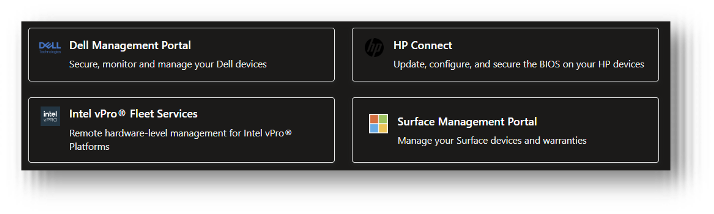
To address this, Microsoft and its OEM partners have built native integrations with Intune and Entra ID, allowing administrators to easily manage most available options through sysadmin-friendly web applications. You can access these integrations in Intune by navigating to Devices – Partner Portals:
Entra ID Based UEFI Authentication with HP Sure Admin
On selected HP systems (such as ProBooks and EliteBooks), HP Sure Admin provides a modern way to protect the BIOS/UEFI layer using passwordless, certificate-based authentication, integrated with Microsoft Entra ID, which aligns BIOS access with Zero-Trust principles and identity controls.
Traditionally, BIOS access has been protected by a static password. In reality, these passwords are often reused, rarely rotated, and shared among administrators due to the physical nature of BIOS access, making them a persistent security risk.
HP Sure Admin replaces this model with certificate-backed authorization. A public Local Access Key (LAK) certificate is provisioned into the device firmware using HP Secure Platform Management (SPM) framework. This establishes a cryptographic trust workflow in UEFI, eliminating the need for a stored BIOS password.
In practice, however, after Sure Admin is enabled (in our example, via Intune and HP Connect), you will see a similar screen while attempting to access the BIOS/UEFI screen on your HP device:
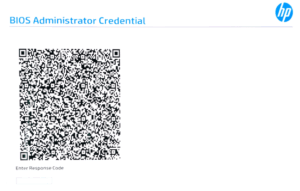
To proceed, simply scan the QR code using the free HP Sure Admin mobile app. The app will redirect you to an Entra ID authentication page, where the standard Entra ID controls, like the usual Conditional Access Policies (like Device Compliance, Risk Status, MFA etc.) and Entra ID role and group checks will apply. After successful authentication, the Sure Admin app will be able to generate a One-time 6-digit response code:
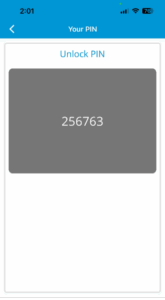
Keep in mind, that the target PC already has the public certificate in the firmware, so it does not need any internet connectivity to proceed, simply enter the PIN on the target PC, and you will find yourself in the BIOS settings pane.
Additionally, you can complete this process using another PC or laptop; the smartphone app is not strictly necessary!
If you or your team are interested in modern firmware-level security, whether through Intune, Microsoft Entra ID, or by locking down your HP fleet’s UEFI using a Zero Trust approach, Black Cell is happy to help. Feel free to reach out with your questions at any time!
Author
László Kovács
CLOUD SECURITY ENGINEER
Related Posts

Think Like an Attacker: Spot the Security Risks
Wi-Fi password posted on the wall ("Office-WiFi / Password: Office123!") Unattended laptop left...

The Extension Threat Vector: Protecting Browsers and Dev Environments?
If your organization doesn’t manage extensions and your users can freely install any browser and...
