
Powershell LocalAccount Manipulation
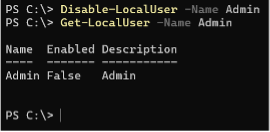
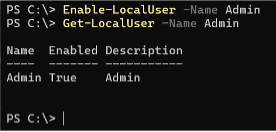
The manipulation of local user accounts with PowerShell commands (related to account management operations) can occur during legitimate administrative tasks but become suspicious when they appear unexpectedly or in an unusual context. Specific cmdlets used to manage local Windows user accounts are ‘Disable-LocalUser’, ‘Enable-LocalUser’, ‘Get-LocalUser’, ‘Set-LocalUser’, ‘New-LocalUser’, ‘Rename-LocalUser’, ‘Remove-LocalUser’.
Once inside a system, attackers commonly create new local accounts with administrative privileges, so they can return even if their initial access vector is closed. These accounts are often given names that look legitimate, and because local accounts operate independently of domain controls, they provide a stable and persistent way back into the machine.
Old service accounts, maintenance accounts, or even the built-in Guest account can be turned back on. Since these accounts are rarely monitored or used, they can provide stealthy ‑long-term‑ access without alerting legitimate users.
 .
. 
By adding themselves, or a compromised user, to groups such as Administrators or Remote Desktop Users, they gain broader control without exploiting additional vulnerabilities. This type of escalation blends easily with legitimate administrative activity unless specifically monitored.
Changing passwords on existing local accounts is another method of account manipulation. Since these accounts already have established trust and permissions, the attacker can continue operating while appearing to be a legitimate user.
Renaming the built-in Administrator account or rebranding their own malicious account to resemble a system or support account disrupts monitoring tools that rely on known account names to detect anomalies.
Attackers may set passwords to never expire, allow interactive logon for accounts that shouldn’t have it, or change profile paths in ways that reduce monitoring visibility. These subtle changes enhance persistence by ensuring the account remains functional and less scrutinized over time.

Creating or modifying accounts whose credentials or password hashes are reused across systems, attackers can leverage techniques such as credential reuse or pass-the-hash to move laterally throughout the network.
To hide evidence of their activities, attackers may delete accounts they created once they no longer need them. Removing an account can obscure the timeline of their operations and complicate forensic investigation.

Account manipulation is often one of the first steps in an attack chain when establishing persistent access. Detecting it in time makes it possible to prevent later, more severe damage. Effective defense requires proper logging, access and privilege management, network segmentation, and the use of multi‑factor authentication.
File Recovery from Backup via WBAdmin.exe
This technique consists of abusing Windows built-in backup and recovery functionality to obtain sensitive system files that are normally inaccessible on a live system. Instead of attempting to read or dump protected files directly, which are usually blocked, monitored, or heavily audited, the attacker restores historical copies of those files from backups using the legitimate wbadmin.exe utility. Because wbadmin.exe is Microsoft signed and commonly used by administrators, its execution often attracts far less attention than custom tools or malware.
With sufficient, administrative or SYSTEM privileges the attacker can enumerate available backups and select a specific backup version, often choosing a point in time before security controls were hardened or credentials were rotated. Using file level recovery options, the attacker restores individual files to a chosen directory, rather than performing a full system or volume recovery. This process results in clean, unlocked copies of sensitive files that are no longer protected by the operating system’s runtime security mechanisms.
These files can be analyzed offline without triggering defenses that normally monitor live credential access. High value targets include Active Directory’s NTDS.dit file, registry hives such as SAM, SYSTEM, and SECURITY, and application configuration files containing embedded credentials or secrets. By working with offline copies, the attacker avoids detection methods focused on LSASS access, memory dumping, or credential guard bypasses, significantly reducing noise and risk.
This technique is especially valuable because backup data often contains historical credentials that may still be valid elsewhere in the environment. Service account passwords, cached domain credentials, or legacy administrative accounts recovered from backups can be reused for lateral movement or privilege escalation. On domain controllers, restoring NTDS.dit from a backup can ultimately allow the attacker to extract password hashes for the entire domain, enabling long-term persistence and dominance.
This method relies entirely on native tooling, blends in with legitimate administrative activity, and sidesteps modern endpoint protections by utilizing offline data. Rather than “breaking into” protected areas of the running system, the attacker retrieves past versions of the data and exploits them at leisure. This makes backup abuse via wbadmin.exe a quiet and highly effective post-exploitation technique for credential theft, lateral movement, and long-term access.
Author
Gábor Lázár
L2 SOC ANALYST / ESM ENGINEER
Related Posts

Think Like an Attacker: Spot the Security Risks
Wi-Fi password posted on the wall ("Office-WiFi / Password: Office123!") Unattended laptop left...

The Extension Threat Vector: Protecting Browsers and Dev Environments?
If your organization doesn’t manage extensions and your users can freely install any browser and...
